
EagleFonts.com The best free font database

Login | Registration | Forgot password

TTF Categories


Fairydust

Bookmark and Share   
Fairydust


Font Toolbox

Download free Fairydust.ttf font from category Featured Fonts. Available in TrueType format (.TTF) for Windows & Mac. Preview Fairydust font by typing your own text.
   
Previous font: Factor

Next font: Ferro Rosso

Free Font Download Free Font Zip Download
   

Font installation tips:


Custom Preview

Custom Text
Custom Colors | Font Name
Viewing options
Casing
Aa  AA  aa

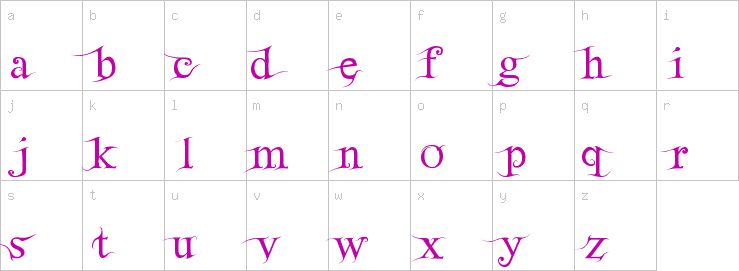
Lowercase characters

Fairydust Lowercase characters

Uppercase characters
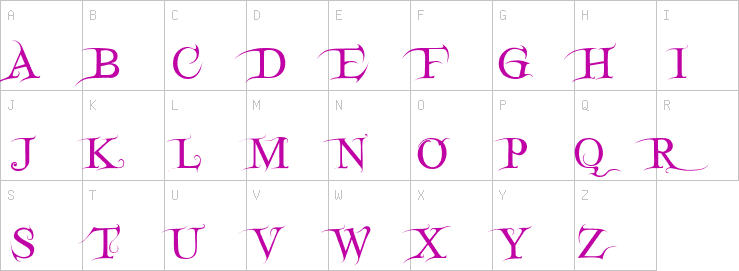
Fairydust Uppercase characters

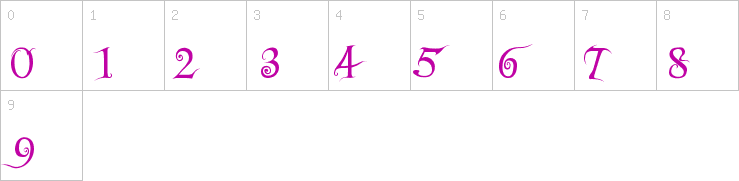
Numbers

Fairydust Numbers

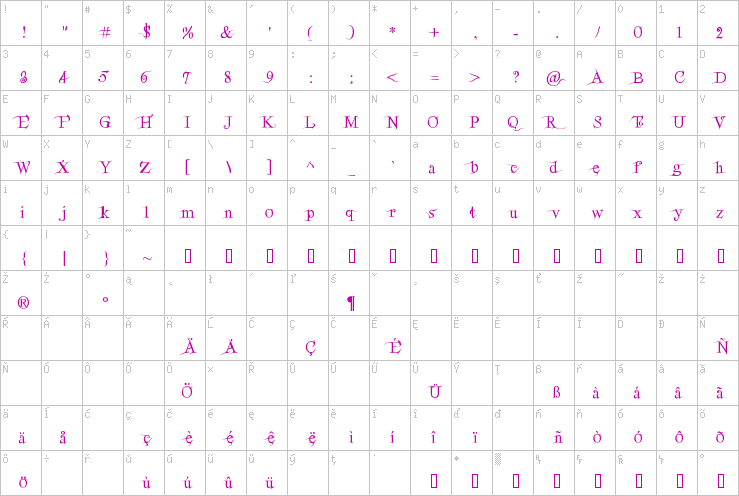
Character map

Fairydust Full character map Tip: Hover you mouse pointer on ttf font Fairydust character map to zoom in.


Fairydust True Type Font - General Information

File size: 60.4 KB
Font Author
Share this font Bookmark and Share
Link to this font
Link:

Font Family nameFairydust
Font Subfamily nameRegular
Unique font identifierMacromedia Fontographer 4.1 Fairydust
Full font nameFairydust
Version stringMacromedia Fontographer 4.1 3/29/2003


Information on how to install Fairydust font

How to install Fairydust.ttf font?

Download and unpack* the font file. You can do this by clicking the Free Font Download** or Free Font Zip Download*** link in “Font Toolbox” section and saving the font file somewhere on your hardrive. We recommend installing only one format of a font. All fonts at eaglefonts.com are TrueType (.ttf) format.

Installing two or more formats of the same font may cause problems when you try to use, view, or print the font. If you are using Safari as your default web browser it will automatically extract a zip file and save it to Downloads folder. Before installing fonts, you should close any open applications. For some applications, new fonts do not appear in the font menu if you install them while the application is open.


* If you chose the “Free Font Zip Download” option.
** For normal (.ttf) version of the font.
*** For compressed (.zip) version of the font.


Windows OS

Installing TrueType fonts in Windows OS


If you temporarily need Fairydust font, you don't need to install it. Just double-click on the Fairydust.ttf file, and while the preview window is opened you can use it in most of the programs you'll launch (apart from a few exceptions like OpenOffice).


Note that with the internal unzip tool of Windows (unlike Winzip), you cannot install a font by a simple drag and drop of the Fairydust.ttf from the zip window to the Fonts window. You must first drag and drop it anywhere (for example on the desktop) then into the Fonts folder.You can also go through: File > Install a new font... in the Fonts folder menu then browse the fonts, instead of drag and drop the fonts into the window. Although this method is laborious, it would seem that it functions better in some cases.


Installing TrueType fonts in Windows 7

Right click the font file Fairydust.ttf and click properties Under the General tab you will see Unblock button Click on it (Ignore this step if there is no Unblock button and continue to steps 1 or 2).

  1. Double click Fairydust.ttf font file and click Install button on the upper left corner.
  2. Copy and Paste or Drag and Drop Fairydust.ttf font file into the Fonts folder. The Fonts folder is located in C:\Windows\Fonts

Installing TrueType fonts in Windows Vista

  • Right click the font file Fairydust.ttf and select Install.

Installing TrueType fonts in Windows 95/98/ME/NT/2000/XP

  1. Option 1: Copy and Paste or Drag and Drop Fairydust.ttf font file into the Fonts folder. The Fonts folder is located in C:\Windows\Fonts or C:\WINNT\Fonts.
  2. Option 2: Navigate to and locate and double click the Fonts folder. Click File and Install New Font select the folder which has the font you want to install and click OK. The Fonts folder is located in C:\Windows\Fonts or C:\WINNT\Fonts.

In XP you can reach the Fonts folder by clicking Start>Control Panel>Appearances and Themes and clicking Fonts icon. In prior version of Windows you can reach Fonts folder by clicking Start>Settings>Control Panel>Fonts


Mac OS

Installing fonts in Macintosh OS


Installing TrueType fonts in Macintosh OS X

  1. In the Finder, open the folder or disk that contains the fonts you want to install.
  2. Select the font suitcases for the font you want to install.
  3. Drag and drop the font into the Fonts folder in the Library folder.

Note: If you want fonts to be available to applications running in Classic mode, you must install TrueType fonts into the fonts folder inside the Classic System Folder.


Installing TrueType fonts in Mac OS 9.x or 8.x

  1. In the Finder, open the folder or disk that contains the fonts you want to install.
  2. Select the font suitcases for the font you want to install.
  3. Drag and drop the font onto the closed System Folder icon.
  4. Click OK to install the font.

Macintosh System 9.x allows you to open 512 suitcases at once. Macintosh System 8.x and earlier only allow you to open 128 font suitcases at one time. If you exceed these limits, not all the fonts you install will work. If you use a font management utility to manage your fonts, follow the instructions for the utility to install and remove fonts.


Linux OS

Installing TrueType fonts in Linux:

  1. Option 1: Copy the font file Fairydust.ttf to fonts:// in the File manager.
  2. Option 2: Go into the /home folder, in the menu select View > Show Hidden Files, you will see the hidden folder .fonts (if not, create it) then copy the font file Fairydust.ttf there.

Sitemap

Dingbats

New Fonts

Script Fonts

Pictorial Fonts

Display Fonts

Text Fonts

Decorative Fonts

Miscellaneous Fonts

Featured Fonts

Foreign Language Fonts